
RightSearch: Powerful Custom Right-Click Context Menu Search
xesam
Cara Install Ekstensi Chrome
- Klik tombol "Add to Chrome" di atas.
- Anda akan diarahkan ke Chrome Web Store.
- Klik "Add to Chrome" pada halaman ekstensi.
- Konfirmasi dengan klik "Add Extension" pada popup.
- Ekstensi akan otomatis terpasang dan ikon muncul di toolbar.
- Klik ikon ekstensi di toolbar untuk mulai menggunakan.
Screenshot
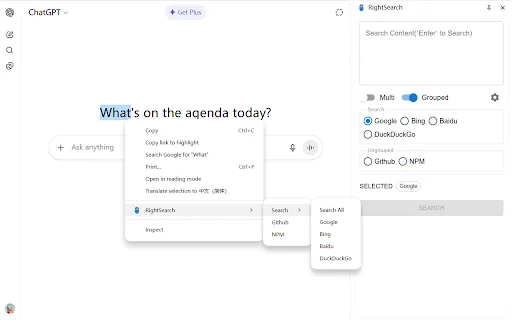
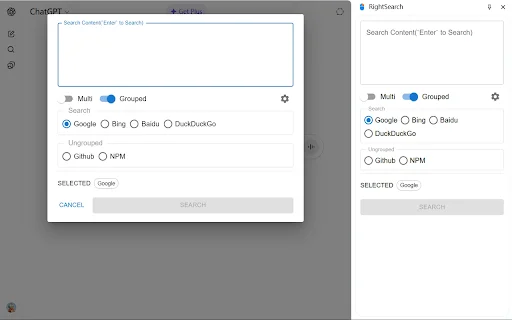
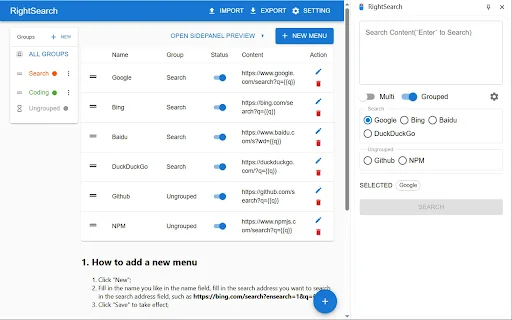
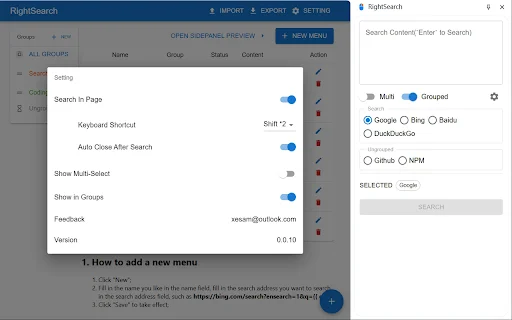
Are you tired of wasting time manually copying text and pasting it into different search engines? RightSearch is the ultimate productivity browser extension designed to streamline your web browsing experience. Whether you are a researcher, a developer, or a casual user, this tool empowers you to perform single or batch searches directly from your browser’s context menu, saving you countless clicks throughout your day.
By leveraging custom search URLs, RightSearch allows you to tailor your web experience to your specific needs. From opening search panels in your sidebar to triggering in-page overlays with custom keyboard shortcuts, RightSearch gives you complete control over your search workflow. Join thousands of users who have optimized their research process with this lightweight, highly efficient browser utility.
Key Features
- Custom context menu integration for rapid searching.
- Support for both single engine and batch search operations.
- Convenient sidebar search panel for multitasking.
- In-page search panel overlay with customizable keyboard shortcuts.
- Fully editable search menus to add your preferred websites.
- Advanced group management to organize your search engines efficiently.
- Lightweight performance with minimal impact on browser speed.
How to Use
- Install RightSearch and navigate to the extension settings page.
- Click “New Menu” to add a website; enter your preferred name and the search URL using {{q}} as the placeholder.
- Enable the “In-Page Search Panel” in settings and assign a unique shortcut key.
- Highlight any text on a webpage and right-click to initiate your custom search instantly.
- Use your assigned shortcut key to trigger the in-page panel for quick lookups without leaving your current tab.
FAQ
Is RightSearch free to use?
Yes, RightSearch is a free browser extension designed to enhance your productivity.
Can I add my own custom search engines?
Absolutely, you can add any website that uses a query-based URL by using the {{q}} parameter in the settings.
What should I do if the keyboard shortcut does not work?
If the shortcut is unresponsive, try refreshing the webpage, as some sites may require a reload to register new extension commands.
Does this extension support batch searching?
Yes, RightSearch allows you to group multiple engines together and execute a batch search with a single click.
Can I manage my search engines in groups?
Yes, the extension features group management, allowing you to organize your search tools for better accessibility and workflow.
Ready to supercharge your web research? Experience a more efficient way to browse the internet by installing RightSearch today. Say goodbye to repetitive tasks and take command of your browser’s search capabilities with ease!
RightSearch is a highly-rated, user-friendly extension that excels at streamlining multi-engine searches via the context menu. While users appreciate its recent updates and utility, they suggest improvements in menu organization, such as pinning, better grouping, and custom sorting.
Kelebihan
- Simple and intuitive interface that is easy to master
- Quickly load selected text into target websites via right-click
- Supports multi-engine search with flexible grouping and management
- Reliable maintenance and active updates from the developer
Kekurangan
- Right-click menu can become cluttered; users request a 'pin' feature
- Lack of advanced group management (e.g., expand/collapse functions)
- Limited options for custom sorting and reordering menu items
Ulasan Pengguna
Wow, it's back! Quick question: how do I set it so that the new search tab doesn't open at the very end of the tab bar?
Can I select a word and then right-click to load it directly into the website? Just like right-clicking on Google to search?
Highlight search is back, very practical plugin. It would be great to have an option to expand or collapse groups, allowing users to either search all engines in a group or select a specific one.
| ID Ekstensi | chjkdlhiakokpljcgekfjajilbigiani |
|---|---|
| Version | 0.0.14 |
| Size | 0.4 MB |
| Developer | xesam |
| Terakhir Diperbarui | |
| Tanggal Rilis | |
| Jumlah Pengguna | 1.000++ |
| Jumlah Ulasan | 18 |
| Chrome Store Ranking | #26265 |
| Category | Productivity |
| Tipe | Free |

Download Cateringwaala AI Assistant – Streamline Your Catering Business
AUM AI Pvt Ltd

FullyFed: Save Web Text to Typefully Drafts Instantly
Bowley

StarConnector: Streamline TikTok Influencer Outreach & Growth
https://tkstar.top

Hapus Watermark Gemini AI Gratis – Download Gambar & Video Bersih
https://geminiwatermarkremover.app

Download Bilibili Comment Search Helper – Cari Komentar Cepat
812372447

Download GEO Metrics Query Extractor – Analisis SEO AI Terbaik
https://trygeometrics.com