
FullyFed: Save Web Text to Typefully Drafts Instantly
Bowley
Cara Install Ekstensi Chrome
- Klik tombol "Add to Chrome" di atas.
- Anda akan diarahkan ke Chrome Web Store.
- Klik "Add to Chrome" pada halaman ekstensi.
- Konfirmasi dengan klik "Add Extension" pada popup.
- Ekstensi akan otomatis terpasang dan ikon muncul di toolbar.
- Klik ikon ekstensi di toolbar untuk mulai menggunakan.
Screenshot
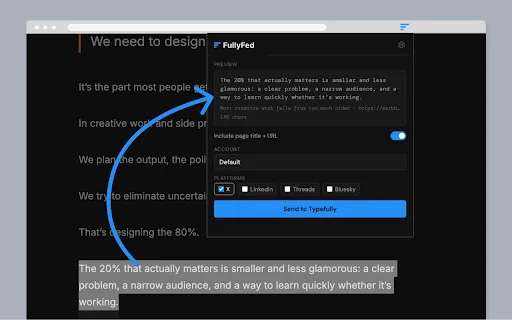
Are you tired of the tedious process of copying, switching tabs, and manually creating drafts every time you find an insightful quote or statistic online? For social media managers and content creators in the US, maintaining a consistent posting schedule is the key to growth, but the friction of moving content from the web to your scheduling tool can kill your productivity. FullyFed is designed to eliminate these interruptions, helping you build a high-quality content pipeline without breaking your focus.
FullyFed acts as the perfect bridge between your browsing experience and your Typefully dashboard. By allowing you to capture text selection and sync it directly to your drafts, this extension ensures that your best ideas are never lost in a sea of browser tabs. Whether you are curating industry insights for LinkedIn or gathering inspiration for an X thread, FullyFed makes content aggregation a seamless part of your daily workflow, saving you hours of repetitive busywork every single week.
Key Features
- Instant text-to-draft conversion for Typefully users.
- Seamless integration with major platforms: X, LinkedIn, Threads, Bluesky, and Mastodon.
- Optional inclusion of page titles and URLs to ensure proper attribution.
- Eliminates constant tab switching and manual copy-pasting.
- Supports streamlined content pipeline creation directly from your browser.
- Pro version features advanced options like pre-send editing.
- Fast and lightweight, ensuring your reading flow remains uninterrupted.
- Helps maintain consistency by making content curation a simple, tiny habit.
How to Use
- Install the FullyFed extension from the Chrome Web Store and ensure you have an active paid Typefully subscription with an API key.
- Navigate to the settings menu via your browser’s extension toolbar to input your Typefully API key.
- Browse any website, highlight the text you want to save, and click the FullyFed icon.
- Choose your target platform and send the draft instantly to your Typefully dashboard for final editing and scheduling.
FAQ
Do I need a paid Typefully account to use FullyFed?
Yes, you must be on a paid Typefully plan to access the API key required for the extension to communicate with your account.
Which social media platforms are supported?
FullyFed supports all platforms that Typefully integrates with, including X, LinkedIn, Threads, Bluesky, and Mastodon.
Can I edit the text before it reaches Typefully?
Basic functionality sends text directly, but the Pro version of the extension allows for editing before the content is sent to your drafts.
How do I access the extension settings if the pop-up button fails?
If you encounter issues with the pop-up menu, simply right-click the extension icon in your browser toolbar and select “Options” to open the settings page directly.
Does this extension save the source URL?
Yes, you can configure the extension to optionally include the original page title and URL, which is great for citation and sourcing.
Stop wasting time on manual copy-pasting and start building your content library more efficiently today. Download FullyFed now to transform your browsing habits into a professional content creation engine and never miss an opportunity to share great ideas again.
Users appreciate the extension's ability to streamline the draft creation process, though some minor UI navigation quirks exist.
Kelebihan
- Simplifies drafting process
- Effective integration with Typefully
Kekurangan
- Settings button in pop-up can be buggy
- Requires navigation to extension options to change settings
| ID Ekstensi | lbomfnenhbplfifphedgjlalbiahjjng |
|---|---|
| Version | 2.5.1 |
| Size | 0.0 MB |
| Developer | Bowley |
| Terakhir Diperbarui | |
| Tanggal Rilis | |
| Jumlah Pengguna | 1.000++ |
| Jumlah Ulasan | 1 |
| Chrome Store Ranking | #23810 |
| Category | Productivity |
| Tipe | Paid |

StarConnector: Streamline TikTok Influencer Outreach & Growth
https://tkstar.top

Download Cateringwaala AI Assistant – Streamline Your Catering Business
AUM AI Pvt Ltd

RightSearch: Powerful Custom Right-Click Context Menu Search
xesam

Hapus Watermark Gemini AI Gratis – Download Gambar & Video Bersih
https://geminiwatermarkremover.app

Download Bilibili Comment Search Helper – Cari Komentar Cepat
812372447

Download GEO Metrics Query Extractor – Analisis SEO AI Terbaik
https://trygeometrics.com